
Microsoft has issued the following announcement:
Windows 10 will reach end of support on October 14, 2025. The current version, 22H2, will be the final version of Windows 10, and all editions will remain in support with monthly security update releases through that date. Existing LTSC (Long-Term Servicing Channel) releases will continue to receive updates beyond that date based on their specific lifecycles.
Microsoft Learn
This applies to Windows Home, Pro, Pro Education, Pro for Workstations, Education, Enterprise, and Enterprise multi-session editions. Extended support is possible for a fee (undisclosed).
Implications for schools
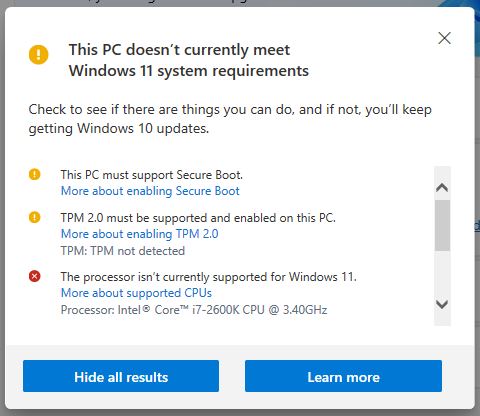
This is not a simple case of updating to the latest version of Windows (currently Windows 11) because Windows 11 has hardware requirements that schools might not be able to meet with their current computers. Microsoft provides a utility called Windows Health Check that will inform you whether your computer can run Windows 11 (the screenshot here shows an example of a processor that is not supported). Computers that are more than five years old may not have a processor that supports Windows 11, which means you either need to replace the computer or upgrade its processor.
Does it matter if we don’t upgrade?
Windows 10 will continue to work after the expiry date, but you will not receive bug fixes and security updates. There is the option, as noted above, to pay for extended support (for up to three years) but pricing has not yet been revealed.
Security
If you remain on Windows 10 and have alternative security measures in place (e.g. a third party anti-virus/malware system such as AVG, McAfee, Symantec, etc.) the impact of no security upgrades from Microsoft is mitigated to some extent. Whilst the third party software can’t plug the gaps in Windows that Microsoft does through its updates, they can and do protect against the malware that could be introduced as a result. So the risk of not upgrading is not as bad as it might appear.
Compatibility
The other issue is application compatibility. When a new operating system is released, developers of applications have to make adjustments to their own software to ensure compatibility with the new platform. Then, when they introduce upgrades, their new version may not run on older operating systems. So the risk is that you may have applications that will no longer run on Windows 10. The mitigation is that you might be able to continue to use an older version of the software, and this will depend on the licensing arrangements.
Conclusion
The first thing to do is check whether your current hardware can be upgraded to Windows 11 – your school should have IT support who will be able to advise on this. If the hardware is capable of being upgraded, then there is no issue (or cost).
If you have non-compatible hardware, then find out how much it would cost to upgrade or replace it it. It may be worth doing this anyway if the hardware is very old as it is likely to run more slowly than a newer system.
As governors, you should be checking that your school is aware of this issue and is taking appropriate steps – this is an operational issue so don’t get involved with the details. However there may be budget issues and it is important that the school is building this into budget forecasting.
 dsga.org.uk